Desert Online General Trading LLC
Dubai, United Arab Emirates
Desert Online General Trading LLC
Dubai, United Arab Emirates


🌐 Elevate your WiFi game — because buffering is so last decade!
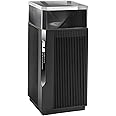
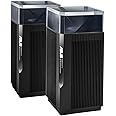
The Asus ET12 AXE11000 is a cutting-edge tri-band WiFi 6E mesh system delivering ultra-fast 11Gbps speeds and expansive coverage up to 6,000 sq. ft. Featuring the latest 6 GHz band, dual 2.5G LAN ports for aggregation, and built-in security with parental controls, it’s designed to future-proof your home or office network with seamless, high-capacity connectivity.


| Brand | ASUS |
| Product Dimensions | 24.3 x 16.5 x 28 cm; 1 g |
| Batteries | 1 AAAA batteries required. |
| Item model number | 90IG05Z0-MO3A10 |
| Manufacturer | ASUS |
| Series | ASUS ZenWiFi Pro ET12 Tri-bande (2,4 GHz / 5 GHz / 6 GHz) Wi-Fi 6E (802.11ax) Noir 3 Interne |
| Colour | Black |
| Standing screen display size | 75 |
| Processor Brand | Intel |
| Processor Type | 5X86 |
| Processor Speed | 3.4 |
| Processor Socket | BGA 413 |
| Memory Technology | DDR3, DDR3, DDR3 |
| Computer Memory Type | DIMM |
| Maximum Memory Supported | 8 GB |
| Hard Drive Size | 80 |
| Hard Disk Description | HDD, HDD |
| Hard Drive Interface | ATA-4 |
| Hard Disk Rotational Speed | 7200 |
| Graphics Card Description | Dedicated |
| Graphics RAM Type | 72-Pin EDO SIMM Memory |
| Graphics Card Ram Size | 8 |
| Graphics Card Interface | AGP |
| Connectivity Type | Wi-Fi |
| Wireless Type | 802.11ax |
| Number of USB 2.0 Ports | 1 |
| Number of USB 3.0 Ports | 1 |
| Voltage | 28 Volts |
| Wattage | 3600 watts |
| Optical Drive Type | BD-R |
| Operating System | Windows 11 |
| Are Batteries Included | No |
| Lithium Battery Energy Content | 2.6 Watt Hours |
| Lithium Battery Packaging | Batteries contained in equipment |
| Lithium Battery Weight | 5 Grams |
| Number Of Lithium Ion Cells | 4 |
| Item Weight | 1 g |
| Guaranteed software updates until | unknown |
J**Y
Brilliant visual design. Review updated 11 August 2024
Original review 4 starsThis is a brilliant visual design that won't look out of place in any modern living or office space. The 2.4GHz, 5GHz, and 6GHz WiFi aerials are all 4x4, but that does mean that the receiving device also needs to have 4x4 aerials to have the fastest link. I have a tablet and a PC card that receives 160MHz at 5GHz and 6GHz (6E), but both have 2x2 aerials. My existing mesh system is two ASUS Zen XT8s with an Ethernet backhaul, so the WiFi 5-2 channel runs at 160MHz; this gives 2.4Gbps in proximity to the XT8s.It's difficult to know if the Amazon Warehouse ET12 that I had is typical, or a previous owner had returned it due to instability with the 5GHz and 6GHz channels. I repeatedly set up all channels and they would be present and operating correctly. After a while, either the 5GHz or the 6GHz channel would drop out leaving the other one running. I also checked with a scanning app that I had lost that signal. Whilst it was operating, the 6GHz 6E channel connected to the tablet at 2.6GHz in the proximity of the router.I've used ASUS motherboards and routers for many years, and know that they normally run without a problem; my XT8s are typical. I wasn't happy to pay even Amazon Warehouses' very reasonable price for a router that was not stable. The ET12 has been returned and my XT8 mesh remains. My experience may not be typical of the ET12.August 2023 UpdateA new ET12 to replace two XT8s in mesh connected with an Ethernet backhaul. The ET12 WiFi distribution is very good, particularly for 5GHz 160MHz. The 6GHz is fine in the proximity of the router that is upstairs, but diminishes in the rooms below; that can be expected with 6GHz. The original intent was to replace the XT8 mesh router with the ET12, as future proofing for when FTTP eventually arrives here. In theory the ET12 and XT8 should be completely compatible with the ET12 as mesh router, but it didn't seem that way. As part of the configuration, I removed the XT8 node downstairs. My wife preferred that look, so for the time being, the ET12 upstairs is a stand alone router, as it has enough 'grunt' for a signal around the house. My wife has an older Microsoft Surface laptop that requires a WiFi 6 dongle to work with the ET12 router (but not the XT8s). The ASUS app is almost a requirement to access the router once it's set up, as entering IP addresses in a browser rarely provides access. I'll consider whether having a second ET12 - in mesh or as an access point - is worthwhile once we have FTTP.Update 11 August 2024I've been running for a few months with an XT8 in mesh with an Ethernet backhaul, that works well. The XT8 doesn't provide 6E, but the transmission from the ET12 is much better than it was. It's been the usual excellent ASUS reliability. Given the cost of the ET12, it would be great if it could be upgraded to WiFi 7.To sum up:* the ET12 price from Amazon is dropping into a more affordable zone (about time) but still expensive for a 6E router;* mesh setup is better now;* ASUS should provide a decent user manual instead of the spartan Quick Start Guide.
P**E
Once working, it is amazing
I bought this to replace 2 WIFI 5 Mesh AP's.Asus claim only 1 ET12 would cover my house. It didn't, so I had to buy a second. They arrive with almost zero documentation, and the website doesn't offer much more support. I found a Youtuber (Eclipse Reviews) who filled in all the blanks. Big thank you to him!You can use the app or a web gui to configure the ET12's. One word of warning, using the app to create passwords will recommend the usual, long pass phrase, mixed with letters, numbers and characters. Not many characters are supported, so though you can enter them, if you try to progress, nothing happens.That's when I turned to the web gui. This tells you when you are typing if the character is not supported.Aside from that, I find the app better than the web gui.I wanted a new mesh system, as the old one topped out at 200Mbps download speeds and I now have 1Gbps fibre.It's been operational for 4 days now. The ET12 is one of those products that shows how bad the previous system was, even if you didn't realise the issues.It is 100% solid. There are so many options to tweak the WIFI.I would sometimes get packet loss on MS Teams calls. The kids would complain of lag spikes when gaming.Their WIFI connection would sometimes drop.All of these issues have gone with Asus. My Router has a 2.5G port, so I connected the first ET12 via that using Ethernet. The second ET12 is a Mesh node.For that I use the 6Ghz band for backhaul. That operates at a stable 1.3Gbps.Static devices (gaming pc's) connect, and stay on the same AP. They'd hop on the old system.The app shows me how all connected devices are performing and their signal strength, so positioning the ET12's needed a bit of work, but no guessing as I could see the results immediately, and move to improve performance. Just a few centimetres could make a huge difference.Note, I did setup them up as the default, with the ET12 acting as Router, and turned on the AI security. It ran perfectly. My use case is using these in AP mode as I wanted to keep my router. I'm sure there are cheaper alternatives, but the performance has justified the expense. I'm essentially getting wired performance in every room, but via WIFI.Fantastic performance, really happy with it.
C**E
Nothing but trouble with this router. It's shocking.
So many problems with this router; it's so bad I went with the AXE16000, which is 20 times better and faster than this ET12. I would not recommend buying this; go with a different Asus model. These ET12s are poorly made; the speed is unacceptable. I had it set up in mesh mode with my AXE16000, and it wasn't until I unplugged the ET12 that I realized it was the ET12 causing my problems. I updated the firmware, gone around in circles trying to figure it out, and waited nearly the whole 30 days but got to the end and had to send it back. So much troubleshooting and headaches didn't fix it, so I returned it. So bad from Asus. Do yourself a favor and get the AXE11000 or 16000.
Trustpilot
1 week ago
2 weeks ago