Desert Online General Trading LLC
Dubai, United Arab Emirates
Desert Online General Trading LLC
Dubai, United Arab Emirates


🎯 Elevate your game with the Magic-NS Lite — wireless freedom, no limits!
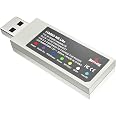
The MAYFLASH Magic-NS Lite is a compact wireless Bluetooth USB adapter designed for seamless compatibility with a wide range of controllers including Xbox Series X/S, PS5, Switch Pro, and more. Supporting advanced features like 6-axis motion sensing, adjustable rumble intensity, turbo and auto fire modes, it delivers a customizable and immersive gaming experience across multiple platforms such as Switch, Windows, Steam Deck, macOS, and Raspberry Pi.


| Color | Multicolor |
| Compatible Devices | Switch, Windows, Steam Deck, macOS, Raspberry Pi, PS3, NEOGEO Arcade Stic Pro, MEGA DRIVE mini, Genesis Mini, Google Stadia controller, Tesla Model 3, DualSense, DualShock 4, Xbox Series X/S, One Bluetooth controllers, Elite Wireless Controller 2, Switch Joy-Con, Wii Remote, U PowerA Nano Enhanced for PDP Victrix Gambit Controller, Hori wired mini Pad Switch(NSW-245), Mad Catz Street Fighter V FightPad PRO, Betop Zeus T6 Gamepad, Razer Raiju Ultimate controller |
| Hardware Interface | Bluetooth, USB, USB Type C |
| Data Link Protocol | USB, Bluetooth |
| Data Transfer Rate | 3 Megabits Per Second |
| Item Weight | 0.02 Kilograms |
A**A
You Need This - Update 12/30/2024: Revert Firmware Update on Your Xbox Controller!
---Update:---My Magic-NS adapter has been working perfectly for nearly 4 years, but I recently ran into an issue and am updating to help others. I've been using the same Xbox One S controller with the Magic-NS adapter on my Switch since my original review without ever updating the firmware on either. I got an Xbox Elite Series 2 for Christmas and had difficulties switching my new controller to the Magic-NS adapter via bluetooth. This is how I got it to work:1. The Xbox One S controller that I had been using wirelessly with the adapter had become bugged. The controller would not disconnect from the adapter and would also not reset. In order to solve this, I connected my Xbox One S controller to my PC via USB cable and updated the firmware on the controller. This caused the controller to change from classic Bluetooth to BLE, which effectively disconnected the controller from the adapter.2. I updated my Magic-NS adapter to the latest version by connecting it to my PC and following the instructions that it came with.3. I connected my Xbox Elite Series 2 controller to my PC via USB cable and reverted the firmware so that it uses classic Bluetooth instead of BLE. I then plugged the Magic-NS adapter back into my Switch dock, made sure it was on the purple setting and attempted to sync the controller wirelessly once again and was successful. It's important to note that it takes much longer for the Elite Series 2 controller to wirelessly connect to the Magic-NS adapter than the One S controller. Once synced, it stays that way. It's been working flawlessly ever since!---Original Review---Boy, am I glad I bought this!After purchasing a Switch at the beginning of the year, I was checking out all of the great accessories that are available and wanted to get a controller to use for when I have it docked instead of always having to use the joycons. I quickly learned that many controllers for the Switch run rampant with problems as well as being ridiculously overpriced (looking at you, Switch Pro Controller). While I wouldn't mind spending money on something of good quality, I just can't purchase something that so many consumers report stopped working right after the return window / warranty runs out. So I decided to have a look at some adapters. I have many Xbox controllers because I own a 360, One S and Series X. I've always preferred the design of an Xbox controller over anything else and thought it would be ideal to be able to use one with my Switch.Upon receiving my product, I was pleased to find that I didn't need to connect it to my pc for any updates for it to work properly. I'm currently using my Xbox One S controller and all I had to do was put the adapter on the purple setting and enable Switch Pro mode on the console. The adapter fits perfectly in the back of the Switch's dock and after about 5 months of using it, it has never disconnected or given me any issues. I like that I can adjust the vibration on the controller to make it stronger or weaker depending on what game I'm playing.There are a few things that I think would improve this product:1.) Turning on the Xbox controller doesn't take the Switch out of sleep mode like it does with the console it's intended for. You have to wake the Switch up via the home button on the joycon.2.) After putting the Switch to sleep, the controller stays on. I remove the battery pack to turn it off instead of waiting forever for it to eventually go to sleep thus unnecessarily draining the charge on the battery pack.3.) I have the button mapping for the controller set to reflect how an Xbox controller should work. While it does save my preset, I have to go into the settings and select it each time I use the controller because it defaults to Nintendo's settings.Regardless of the improvements I feel would make the adapter better, it's important to remember that controllers for other consoles have never been intended to work on a Switch; so the fact that the adapter does just that makes this a genius hack and excellent accessory for the Switch. Despite the minor inconveniences I mentioned, I'm grateful to have found this product and recommend it to anyone who doesn't want to waste money on the low quality, overpriced controllers that Nintendo licenses.
B**T
Amazing!
This lets me use my Wii U controller for my switch, meaning I don't have to buy extra JoyCons. 10/10! It works perfectly every time.
J**D
Solid product, a few minor complaints
I bought this adapter because I wanted to use my old Xbox 360 Afterglow controller with my Switch. I haven't been disappointed. The Afterglow controller worked immediately upon plugging it in with no additional setup. I've also tried a few of my wireless Xbox One controllers (note that only the newer models with Bluetooth work). Setting these up wasn't the most intuitive process, but it was simple enough. You'll need to consult the instructions or watch a tutorial your first time.If you plan to use an Xbox controller, note that the Switch's A/B and X/Y buttons are reversed. The adapter has a built-in feature to accommodate for the discrepancy. Pressing a specific button combo will functionally reverse the buttons so that what is displayed on the screen (e.g. "Press A to start") will correspond to the appropriate button on the Xbox controller. This can be troublesome in some games that use a button diagram rather than listing letters (like in MarioKart). Still, it's a nice feature.It's also important to note that rumble is NOT supported with wireless Xbox One controllers. Rumble does, however, work weith USB controllers, like my Afterglow. It's great!I do have a few minor complaints. First and foremost, the LED light is a little too bright. Even worse, it NEVER stops blinking if you're using a USB controller. Put a sleep timer on that thing, Mayflash! The adapter also just "feels" cheap and wiggles around a little too much when inserted into one of the Switch's USB ports. It stays put, but I don't like it. I'm also not crazy about the beige color of the device. This isn't a big deal if you plan to use the USB port on the inside of the dock (which works quite well if you're using a wireless controller, I might add).Overall, this crafty adapter works well, but there is nothing premium about its construction or look.
Trustpilot
5 days ago
1 month ago
1 week ago
1 week ago